

OVERVIEW
JOLT divides the incoming signal into two frequency bands, a low band and a high band, and shapes the transient of each band separately. A transient is the short burst of energy at the start of a sound, such as the initial hit of a drum. The SHAPE control adjusts the attack and sustain of both bands at the same time, so a single control sets the overall amount of shaping. The per-band ATTACK and SUSTAIN controls then adjust each band on top of that.
Transient detection is level-independent, which means a quiet hit and a loud hit are shaped the same way. With DETECT set to ADAPT, the shaping follows the dynamics of the material being processed.
After the bands are shaped and recombined, the signal passes through the VIBE compressor (SQUEEZE sets the amount of compression, WARMTH sets the amount of saturation), then a stereo section that widens the body of the sound while keeping content below 140 Hz in mono. The OUTPUT stage adds optional console-style drive above 0 dB, and AUTO matches the output level to the input so that bypassed and processed sound are compared at a similar loudness.
INTERFACE
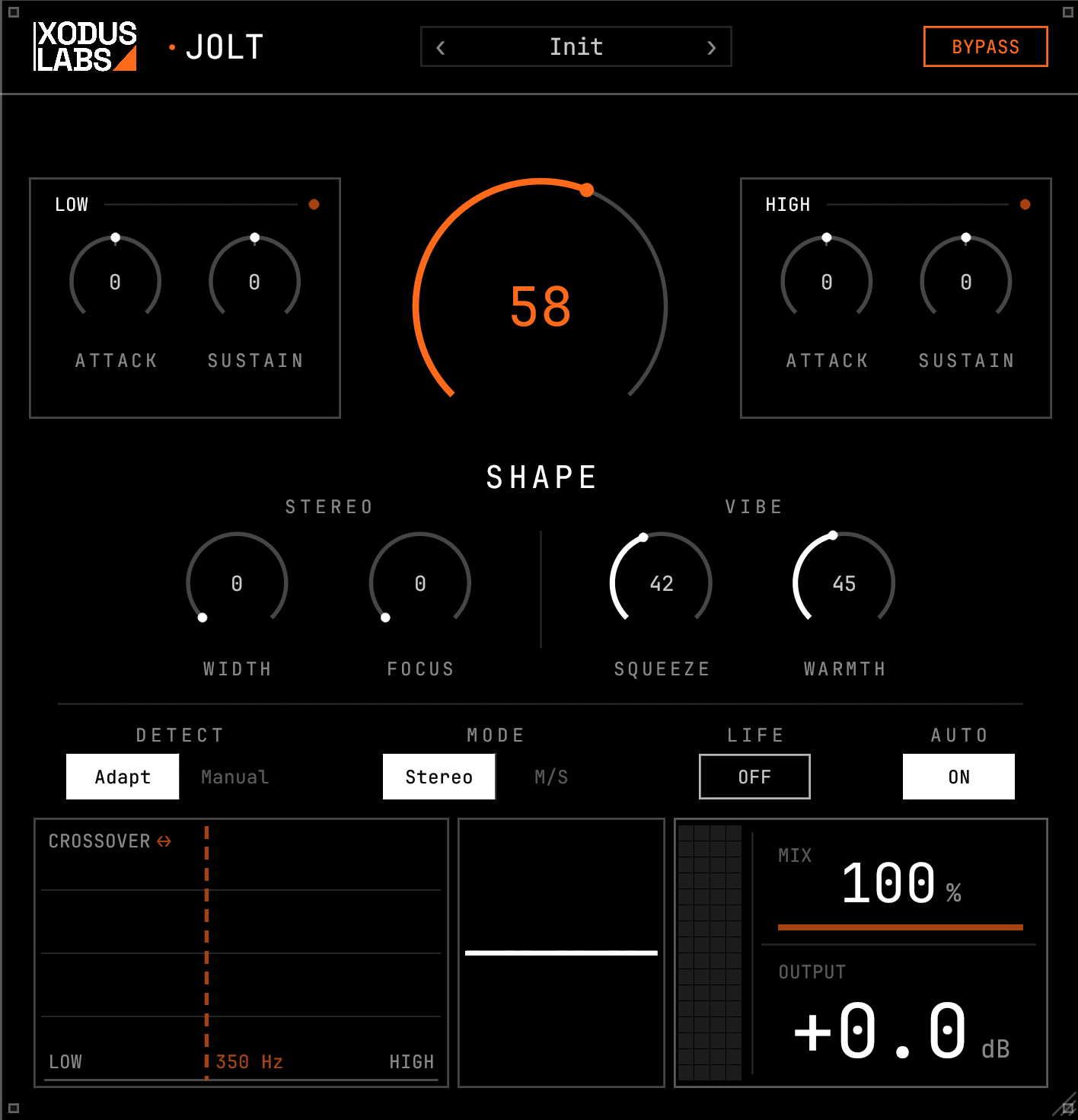
SIGNAL CHAIN
The order in which JOLT processes the signal, from input to output.
- 01Transient detection (reads the mono sum and sets the release of each band)
- 02Split into a low band and a high band at the CROSSOVER frequency
- 03Per-band transient shaping (attack and sustain, set by SHAPE plus the per-band controls)
- 04Recombine the two bands
- 05VIBE compressor (SQUEEZE sets compression, WARMTH sets saturation)
- 06MIX (blend of processed and unprocessed signal)
- 07Stereo section (WIDTH widens the body, FOCUS centers transients, low end stays mono)
- 08AUTO level match and LIFE movement
- 09OUTPUT level and optional console drive
- 10Output limiting (JOLT does not hard-clip)
CONTROLS
SHAPE
| Control | Range | Default | Description |
|---|---|---|---|
| SHAPE | 0..100 % | 58 | Adjusts attack and sustain on both bands together. This is the main transient-shaping control.Higher values increase the amount of transient shaping across the whole signal. It applies a set bias to the attack and sustain of both bands at once; the per-band controls adjust each band on top of it. At 0 there is no shaping. The default of 58 applies a moderate amount. |
BANDS
| Control | Range | Default | Description |
|---|---|---|---|
| LOW ATTACK | -100..+100 % | 0 | Adjusts the attack of the low band. Positive values emphasize the onset of low hits; negative values soften it.Use it to add or reduce punch on kick and bass onsets. Applied on top of the SHAPE setting. |
| LOW SUSTAIN | -100..+100 % | 0 | Adjusts the sustain of the low band. Positive values lengthen the low tail; negative values shorten it.Use negative values to tighten a boomy low tail, or positive values to add body and ring. |
| HIGH ATTACK | -100..+100 % | 0 | Adjusts the attack of the high band. Positive values sharpen the onset; negative values soften it.Use it to add snap to a snare, pick attack on an instrument, or consonant definition on a vocal. |
| HIGH SUSTAIN | -100..+100 % | 0 | Adjusts the sustain of the high band. Positive values add brightness and decay; negative values shorten it.Use positive values to add air on busses and vocals, or negative values to shorten ringing cymbal and snare tails. |
| CROSSOVER | 120..2000 Hz | 350 | Sets the frequency that divides the low band from the high band.Lower it (around 160 Hz) to keep the kick and bass in the low band. Raise it (around 700 to 900 Hz) to place a vocal or instrument attack in the high band. |
VIBE
| Control | Range | Default | Description |
|---|---|---|---|
| SQUEEZE | 0..100 % | 42 | Sets the amount of compression in the VIBE stage.Higher values lower the threshold and apply more compression, with automatic make-up gain. It uses a soft-knee 3:1 ratio with a feedback detector and a slow release. At 0 the compressor is bypassed. |
| WARMTH | 0..100 % | 45 | Sets the amount of saturation in the VIBE stage.Adds tube and transformer-style harmonics and a small shift toward fuller lows and softer highs. It is independent of SQUEEZE: WARMTH sets the color, SQUEEZE sets the compression. At 0 there is no added color. |
STEREO
| Control | Range | Default | Description |
|---|---|---|---|
| WIDTH | 0..100 % | 0 | Widens the stereo body of the sound. Content below 140 Hz stays in mono.Higher values open the stereo image of the sustained part of the signal and add a small amount of high-frequency air. JOLT does not widen out-of-phase content, so the mono sum is preserved. At 0 it is bypassed. |
| FOCUS | 0..100 % | 0 | Pulls transients toward the center while the sustained image stays wide.Higher values keep hits centered for a solid mono impact. Often used together with WIDTH. At 0 it is bypassed. |
OUTPUT
| Control | Range | Default | Description |
|---|---|---|---|
| MIX | 0..100 % | 100 | Blends the processed signal with the unprocessed signal.100 is fully processed. Lower values mix in the dry signal for parallel processing, which is common on busses and the master. The dry signal is time-aligned with the processed signal. |
| OUTPUT | -12..+12 dB | 0 | Sets the output level. Values above 0 dB add console-style drive.At or below 0 dB the output is clean. Above 0 dB it gradually adds saturation, reaching full drive at +12 dB. |
| AUTO | Off / On | On | Matches the output level to the input level.When on, the processed and bypassed signals are at a similar loudness, which makes comparison easier. Turn it off for manual output control. |
GLOBAL
| Control | Range | Default | Description |
|---|---|---|---|
| DETECT | Adapt / Manual | Adapt | Sets how the transient detector responds. ADAPT follows the material; MANUAL uses a fixed response.ADAPT is a good default for varied material. MANUAL gives a consistent, predictable response. |
| MODE | Stereo / M-S | Stereo | Sets whether shaping is applied to left and right, or to mid and sides.STEREO shapes the left and right channels. M-S shapes the center and the sides separately, so you can shape the center without affecting the wide elements. |
| LIFE | Off / On | Off | Adds slow, subtle level movement.A small amount of gentle movement, off by default. Mainly used on busses and the master. |
| BYPASS | Off / On | Off | Bypasses all processing. The input passes through unchanged. |
WORKFLOWS
Add punch to a kick
- 01Set CROSSOVER to around 160 Hz so the kick body is in the low band.
- 02Raise SHAPE until the onset stands out. A value around 60 to 70 is a typical starting point.
- 03Add some LOW ATTACK for more punch, and set LOW SUSTAIN to a negative value to tighten the tail.
- 04If the result is too strong, lower MIX toward 90 to mix in some of the dry signal.
Sharpen a snare
- 01Set CROSSOVER near 500 Hz so the snare snap is in the high band.
- 02Raise SHAPE for overall shaping, then add HIGH ATTACK for the snap.
- 03Set HIGH SUSTAIN to a negative value to shorten a long ring, or a positive value to add brightness.
Compress a drum bus
- 01Keep SHAPE moderate, around 50, so the shaping is gentle.
- 02Raise SQUEEZE for compression and WARMTH for saturation.
- 03Add a little WIDTH and FOCUS so the body opens while the transients stay centered.
- 04Turn LIFE on for subtle movement, and leave AUTO on so the comparison stays at a matched level.
Widen without phase problems
- 01Raise WIDTH to open the body and add air. Content below 140 Hz stays in mono.
- 02Add FOCUS so transients move back toward the center for a solid mono impact.
- 03Check the mono sum. JOLT does not widen out-of-phase content, so the sound should still combine to mono cleanly.
GOOD TO KNOW
- 01SHAPE is level-independent: the same hit is shaped the same way regardless of its level.
- 02Leave AUTO on while adjusting settings so you compare the effect at a matched level rather than by loudness.
- 03WIDTH keeps everything below 140 Hz in mono, so the low end stays centered even at high width settings.
- 04OUTPUT is clean at or below 0 dB. Set it above 0 dB to add console-style drive.
- 05JOLT does not hard-clip; it limits gently at the ceiling. For clipping as an effect, use DAC-CLIP.
- 06Set MIX below 100 for parallel processing on busses and the master.