

OVERVIEW
REEL-COMP is a compressor with tape-style saturation, transport motion, and stereo shaping in one signal path. The order mirrors a real tape machine: the program is compressed first, like a record head riding gain, then saturated by the tape medium, then subjected to transport wow and flutter, then widened, blended, and run through an output transformer. Most controls are percentages, so a setting reads the same regardless of source material.
Several controls (the BIAS center, compression ratio and release, mix, and saturation) are continuously nudged by an internal program-analysis layer that reads the dynamics and tone of the material, so the processor reacts to what you feed it rather than applying a static curve. A soft ceiling sits at the very end and gently catches peaks near 0 dBFS, so the output stays clean without a separate limiter.
Two concepts recur throughout. DECK is the tape-machine personality (SILK, VELVET, OXIDE, GRIT, FERRO): it changes the saturation curve, the compression bias, transport stability, and how AGE and MAGNET behave. COMP is the compressor topology (CLEAN, 303, 160, HYST): it changes how the dynamics feel for the same PRESSURE setting. In every topology, ATTACK sets attack and GRIP sets release, and each topology keeps its own characteristic speed range. The millisecond readout on ATTACK is exact only in CLEAN.
INTERFACE
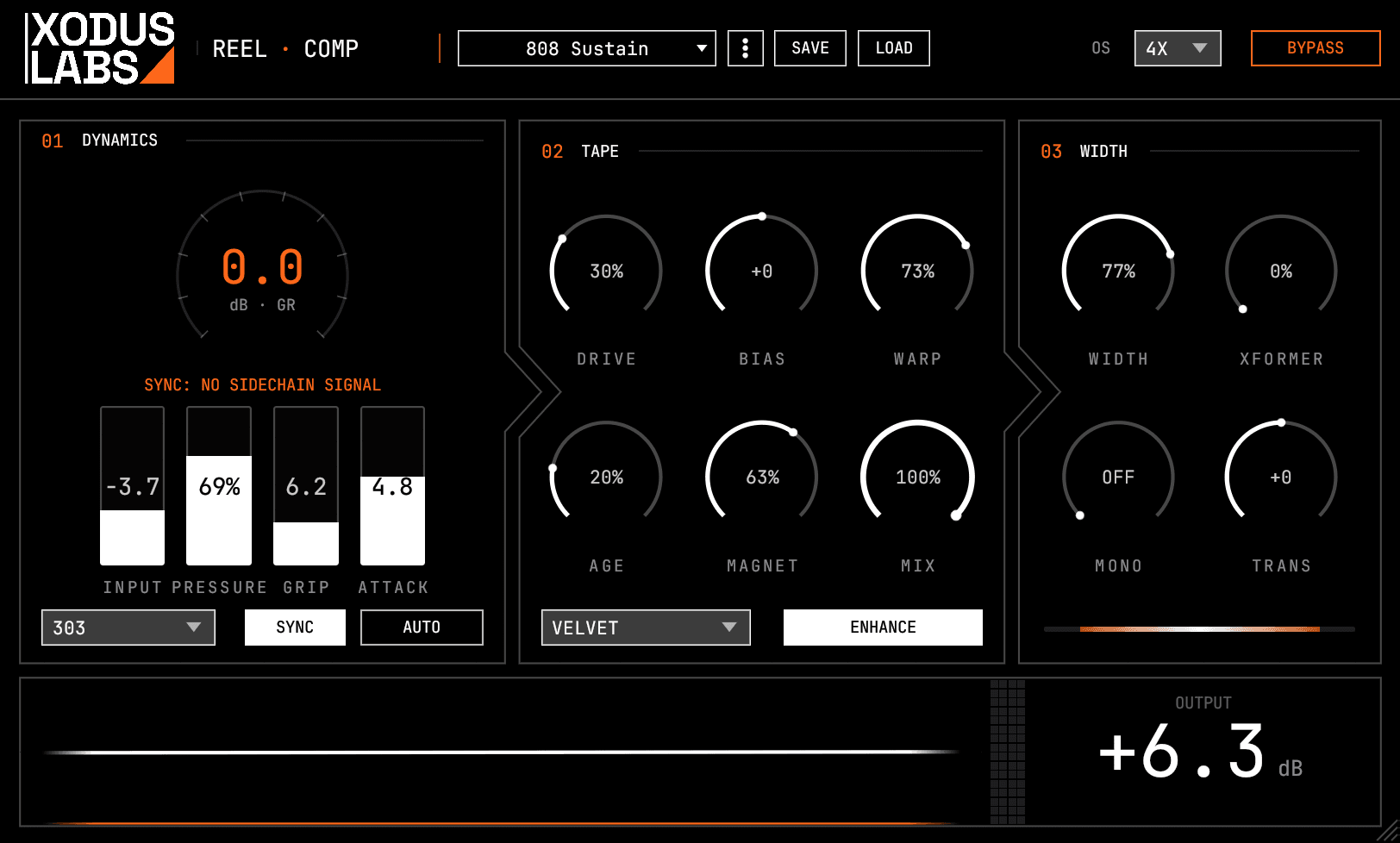
SIGNAL CHAIN
The order in which REEL-COMP processes the signal, from input to output.
- 01INPUT gain (drives the compression and saturation harder)
- 02Program analysis (reads dynamics, tone, and transients to modulate the controls below)
- 03Compression (CLEAN, 303, 160, or HYST topology; SYNC overrides timing from the sidechain)
- 04Tape saturation through the selected DECK, with DRIVE, BIAS, AGE, and MAGNET
- 05Transport motion: WARP wow and flutter, plus AGE flutter
- 06Stereo section: WIDTH, TRANS transient-differential width, ENHANCE side shimmer, MONO bass mono-maker
- 07MIX dry/wet blend (delay-compensated, transient-aware parallel compression)
- 08Output transformer (XFORMER iron-core saturation)
- 09OUTPUT gain, then a soft ceiling near 0 dBFS
CONTROLS
INPUT
| Control | Range | Default | Description |
|---|---|---|---|
| INPUT | -12..+12 dB | 0 | Input gain applied before the compression and saturation.Sets how hard the signal hits the compressor and tape stage. Pushing it up drives more saturation and gain reduction, then trim the result with OUTPUT. |
COMPRESS
| Control | Range | Default | Description |
|---|---|---|---|
| PRESSURE | 0..100 % | 30 | Compression amount, combining threshold and ratio in one control.At 0 there is no compression; raising it lowers the threshold and increases the ratio together. Set it by how much gain reduction you want, then shape the feel with COMP, ATTACK, and GRIP. |
| GRIP | 0..100 % | 50 | Compression release feel: low is fast and pumpy, high is slow and gluey.GRIP sets the release in every topology, mapped into the native range of each one. Lower values pump and breathe for energy, higher values smooth and glue a bus together. |
| ATTACK | 0.1..100 ms | 10 | Attack time of the compressor in every mode.Fast attack clamps transients for a controlled, punchy sound; slow attack lets transients through for a more open, glue-style result. The millisecond readout is exact in CLEAN; the other topologies map the knob into their own attack ranges. |
| MIX | 0..100 % | 100 | Dry/wet blend for parallel compression.At 100 you hear the fully processed signal; lower values mix in the clean input for parallel (New York style) compression. The dry path is delay-compensated to stay phase-coherent, and the blend is transient-aware so attacks keep more of the dry signal. |
| COMP | CLEAN / 303 / 160 / HYST | CLEAN | Compressor topology that sets the dynamic character.CLEAN is a transparent, musical feed-forward compressor. 303 is an SP-303 style feedback compressor that pumps and sounds lo-fi. 160 is a DBX 160 style VCA with a hard knee, punchy and aggressive. HYST is an experimental hysteresis compressor whose gain sticks based on signal direction. Choose by how obvious you want the compression to feel. |
| SYNC | Off / On | Off | Trigger compression driven by the external sidechain.When on, a routed sidechain supplies the timing and shape of the gain reduction while the internal signal sets the amount, locking compression to an external rhythm. It needs a sidechain routed to the aux input; with nothing routed there is no trigger and no compression. |
SATURATE
| Control | Range | Default | Description |
|---|---|---|---|
| DECK | SILK / VELVET / OXIDE / GRIT / FERRO | SILK | Tape machine archetype that sets the saturation and transport personality.SILK is a clean, stable studio machine with maximum headroom. VELVET is warm and flattering. OXIDE is extended-bandwidth and detailed. GRIT is aggressive and unstable. FERRO is a lo-fi cassette with heavy coloration. The DECK also changes the compression bias and how AGE and MAGNET behave. |
| DRIVE | 0..100 % | 30 | Saturation intensity: how hard the tape is driven.At 0 the saturation is minimal; raising it adds more tape harmonics and a compression-like density. It was labeled HEADROOM before release and renamed DRIVE because turning it up increases saturation. |
| BIAS | -100..+100 % | 0 | Pre-saturation frequency tilt, from dark to bright.Negative values roll off the highs for a dark, wooly tone before the tape stage; positive values lift the highs for a brighter, more present sound. The tilt center also follows the tone of the material through the program-analysis layer. |
| AGE | 0..100 % | 0 | Worn-tape simulation: high-frequency loss, earlier saturation, bias drift, softer attack.Raising AGE dulls the top end, reduces headroom so the tape saturates sooner, drifts the bias slowly for tonal instability, and softens the compressor attack in every mode. It also increases flutter, but only when WARP is above zero. Each DECK ages differently. |
| MAGNET | 0..100 % | 0 | Magnetic tape character: deeper hysteresis plus level-dependent high-frequency loss.Higher values deepen the hysteresis curve so saturation begins earlier. They also add level-dependent top-end loss, so loud passages dull while quiet passages stay open. |
MOTION
| Control | Range | Default | Description |
|---|---|---|---|
| WARP | 0..100 % | 0 | Tape transport motion: wow and flutter intensity.At 0 there is no motion at all; raising it introduces pitch wobble from subtle analog drift up to heavy worn-cassette warble. WARP is the master gate for all transport motion, so the pressure-reactive instability and the AGE flutter are silent until WARP is raised. |
STEREO
| Control | Range | Default | Description |
|---|---|---|---|
| WIDTH | 0..200 % | 100 | Stereo width via mid/side scaling.0 collapses to mono, 100 is the original stereo image, and 200 doubles the side channel for a wider field. Use it to fold a bus to mono for checking, or to open up a narrow source. |
| MONO | 0 (OFF), 20..500 Hz | OFF | Bass mono-maker: sums everything below the set frequency to mono.At 0 it is off; setting a frequency between 20 and 500 Hz sums everything below it to mono. Use it to tighten the low end for vinyl or club playback while keeping the highs wide. |
| TRANS | -100..+100 % | 0 | Differential width for transients versus sustain.Negative values make transients narrower than the sustain for a punchy center with wide tails; positive values make transients wider for explosive attacks with a focused body. At 0 transients and sustain get the same width. |
| ENHANCE | Off / On | Off | Side-channel shimmer enhancement toggle.When on, it adds a soft-saturation shimmer to the side channel only, lifting the side level slightly and adding a little third-harmonic content. Use it to make a stereo image feel more alive without changing WIDTH. |
OUTPUT
| Control | Range | Default | Description |
|---|---|---|---|
| XFORMER | 0..100 % | 0 | Iron-core output transformer saturation.At 0 it is bypassed; raising it adds frequency- and level-dependent color with low-frequency sag, core saturation, and a high-frequency rolloff. It sits at the end of the chain, separate from the tape saturation, so it adds weight and glue on top of the DECK character. |
| OVERSAMPLE | OFF / 2X / 4X | OFF | Oversampling for the nonlinear stages, trading latency for less aliasing.OFF is zero latency; 2X and 4X oversample the saturation to reduce aliasing on bright or heavily driven material, at the cost of added latency. It is not automatable, so set it before playback rather than changing it live. |
| OUTPUT | -30..+12 dB | 0 | Output gain applied after processing.Use it to make up or trim level after the compression and saturation change the loudness. A soft ceiling near 0 dBFS follows it to catch peaks gently. |
| BYPASS | Off / On | Off | Hard bypass that passes audio through unprocessed.When on, the input is returned unchanged. Use it for a quick A/B against the dry signal. |
WORKFLOWS
Glue a drum bus
- 01Set COMP to CLEAN and DECK to SILK for a controlled, transparent start.
- 02Raise PRESSURE until you see a few dB of gain reduction on the loudest hits.
- 03Set ATTACK around 10 to 30 ms so the initial transient passes, and raise GRIP for a slow, gluey release.
- 04Add a little DRIVE for tape density, then trim OUTPUT to match the bypassed level.
- 05For more punch and attitude, switch COMP to 160 for its hard-knee VCA character.
Warm up a synth or DI
- 01Choose DECK VELVET for a warm, flattering tone.
- 02Raise DRIVE to 30 to 50 percent for audible tape saturation.
- 03Use BIAS negative to tame harshness, or positive to add presence.
- 04Add XFORMER for low-frequency weight at the end of the chain.
- 05Keep PRESSURE low if you only want color rather than dynamic control.
Parallel compression
- 01Set COMP to 160 or 303 and push PRESSURE high for obvious, dense compression.
- 02Use a fast ATTACK and low GRIP so the compressed path is aggressive and pumpy.
- 03Pull MIX down from 100 until the compressed signal sits under the dry transients.
- 04The dry path is delay-compensated and transient-aware, so attacks stay clear as you blend.
- 05Trim OUTPUT to match the level you had before engaging the plugin.
Tape width on a master
- 01Pick DECK OXIDE for extended bandwidth and detail, with low DRIVE for subtlety.
- 02Set MONO around 80 to 120 Hz to keep the low end centered and tight.
- 03Raise WIDTH slightly above 100, and add ENHANCE for side shimmer if you want more air.
- 04Add a small amount of WARP only if you want gentle analog motion; leave it at 0 for a clean master.
- 05Set OVERSAMPLE to 2X or 4X to reduce aliasing, before playback since it is not automatable.
GOOD TO KNOW
- 01The signal order is fixed and tape-accurate: compression happens before saturation, so driving INPUT or PRESSURE harder also feeds more level into the tape stage. Use OUTPUT to compensate.
- 02The ATTACK millisecond readout is exact only in CLEAN. In 303, 160, HYST, and SYNC the knob maps into the attack range of each topology, so the same number can feel different across modes.
- 03WARP is the master gate for all motion. The AGE flutter and the pressure-reactive instability stay silent until WARP is above zero, so raise WARP first if you expect movement.
- 04DECK is not just a saturation curve. It also shifts the compression bias and knee, the transport stability, and how AGE and MAGNET respond, so switching DECK can change the dynamics even at the same PRESSURE.
- 05OVERSAMPLE is not automatable and adds latency at 2X and 4X. Set it once before playback rather than changing it during a take.
- 06A soft ceiling sits after OUTPUT and gently limits peaks near 0 dBFS, so the plugin will not hard-clip, but it is not a substitute for a dedicated mastering limiter.
- 07SYNC needs an external sidechain routed to the aux input. With nothing routed there is no trigger and the compressor produces no gain reduction in that mode.